Heterogeneous flow
The best way to run foxes calculations on heterogeneous background flow fields is by providing them in netCDF format. The following coordinates are supported (can be None if not present):
A state coordinate, e.g.
Time(expected by default) orstate, or similarA height coordinate, e.g.
height(expected by default) orh, or similarA
ycoordinate, e.g.UTMY(expected by default) ory, or similarA
xcoordinate, e.g.UTMX(expected by default) orx, or similar
The file may contain any kind of foxes variables as data fields, e.g.:
Wind speed data, e.g.
WS(expected by default, if claimed as output variable),wsor similarWind direction data, e.g.
WD(expected by default, if claimed as output variable),wdor similarTurbulence intensity data, e.g.
TI(expected by default, if claimed as output variable),tior similarAir density data, e.g.
RHO(expected by default, if claimed as output variable),rhoor similar
All data must depend on the state coordinate, and may depend on the others.
These are the required imports for this example:
%matplotlib inline
import matplotlib.pyplot as plt
import numpy as np

import foxes
import foxes.variables as FV
/home/runner/work/foxes/foxes/foxes/core/engine.py:6: TqdmExperimentalWarning: Using `tqdm.autonotebook.tqdm` in notebook mode. Use `tqdm.tqdm` instead to force console mode (e.g. in jupyter console)
  from tqdm.autonotebook import tqdm
For parallelization we will use the following engine:
engine = foxes.Engine.new("process")
One very simple example for netCDF type data is provided in the static data, under the name wind_rotation.nc. It contains two states, two heights, and simple 2 x 2 horizontal data that describes identical wind speeds at all four corner points associated with different wind direction values. It can be loaded as follows:
states = foxes.input.states.FieldData(
    data_source="wind_rotation.nc",
    states_coord="state",
    x_coord="x",
    y_coord="y",
    h_coord="h",
    time_format=None,
    output_vars=[FV.WS, FV.WD, FV.TI, FV.RHO],
    var2ncvar={FV.WS: "ws", FV.WD: "wd"},
    fixed_vars={FV.RHO: 1.225, FV.TI: 0.1},
    load_mode="preload",
    bounds_extra_space=1000,
    interp_pars=dict(bounds_error=False),
)
The bounds_extra_space parameter is here set to 1000 meters. Alternatively, distances can be specified as multiples of the rotor diameter as string, e.g., 2D. If not None this cuts the input data spatially to the specified extension of the wind farm boundary area.
Note that it is recommended that the states object should be created outside the Engine context when working with NetCFD input.
Now back to our example. Let’s place a simple 3 x 3 grid wind farm inside the data domain, which is a rectangle between (0, 0) and (2500, 2500):
farm = foxes.WindFarm()
foxes.input.farm_layout.add_grid(
    farm,
    xy_base=np.array([500.0, 500.0]),
    step_vectors=np.array([[500.0, 0], [0, 500.0]]),
    steps=(3, 3),
    turbine_models=["NREL5MW"],
    verbosity=0,
)
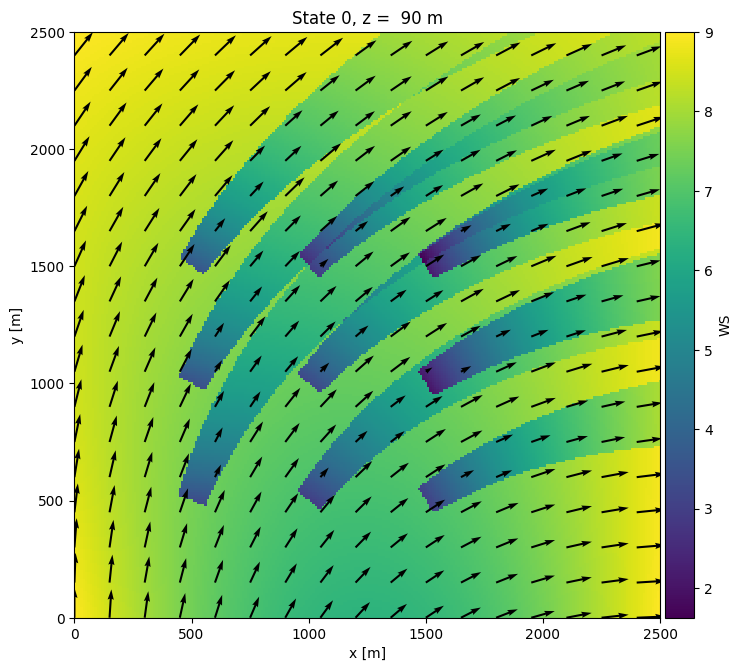
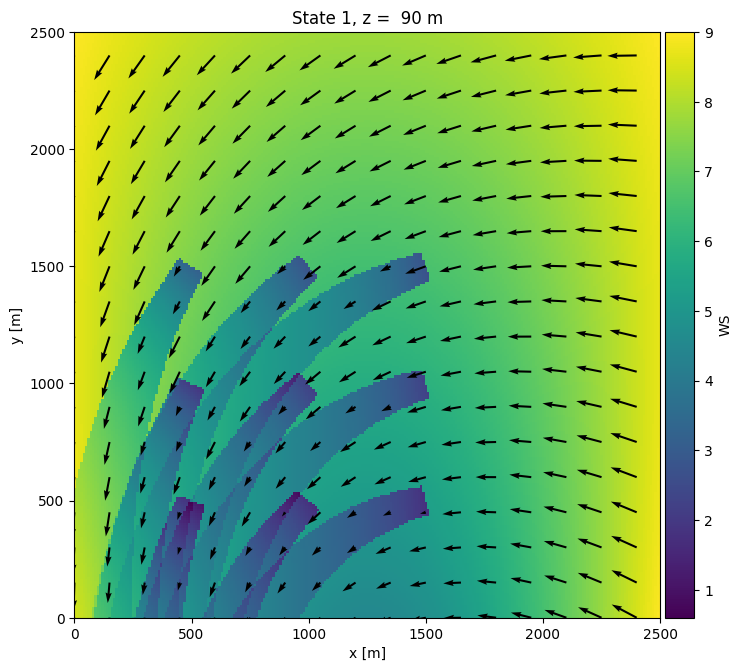
The streamline following wakes are realized by selecting a wake frame that is an instance of foxes.models.wake_frames.Streamlines2D, e.g. the model streamlines_100 in the model book. This model has a streamline step size of 100 m. Additionally we define a maximal wake length of 3 km for this example:
algo = foxes.algorithms.Downwind(
    farm,
    states,
    rotor_model="grid16",
    wake_models=["Jensen_linear_k007"],
    wake_frame="streamlines_100",
    max_wake_length_km=3.0,
    verbosity=0,
)
We run the algorithm, once explicitely for calculating the wind farm data, and once implicitely when creating horizontal flow plots:
with engine:
    farm_results = algo.calc_farm()

    fr = farm_results.to_dataframe()
    print(fr[[FV.WD, FV.AMB_REWS, FV.REWS, FV.AMB_P, FV.P]])

    o = foxes.output.FlowPlots2D(algo, farm_results)
    plot_data = o.get_states_data_xy(
        FV.WS,
        resolution=10,
        xmin=0,
        xmax=2500,
        ymin=0,
        ymax=2500,
    )

for fig in o.gen_states_fig_xy(
    plot_data,
    figsize=(8, 8),
    quiver_pars=dict(angles="xy", scale_units="xy", scale=0.07),
    quiver_n=15,
):
    plt.show()
    plt.close(fig)
ProcessEngine: Calculating 2 states for 9 turbines
ProcessEngine: Starting calculation using 3 workers, for 2 states chunks.
ProcessEngine: Completed all 2 chunks

                       WD  AMB_REWS      REWS        AMB_P            P
state turbine
0     0        201.158095  7.491089  7.491089  1473.946967  1473.946967
      1        208.044995  7.673386  7.673386  1580.390120  1580.390120
      2        214.523994  7.960601  7.960601  1748.094781  1748.094781
      3        218.242347  6.867298  6.867298  1127.536970  1127.536970
      4        222.297881  7.283373  7.283373  1352.661617  1352.661617
      5        225.899315  7.731909  6.812258  1614.561763  1102.791199
      6        236.751305  6.932726  6.932726  1156.953535  1156.953535
      7        237.139686  7.375640  7.375640  1406.536169  1406.536169
      8        237.484050  7.818854  7.818854  1665.328947  1665.328947
1     0         20.311353  6.703701  5.738944  1053.983972   650.485470
      1         26.259090  6.995899  5.942894  1185.355969   718.543621
      2         31.676969  7.357075  7.357075  1395.696258  1395.696258
      3         44.537114  5.352448  5.352448   521.511751   521.511751
      4         47.447854  5.960030  5.960030   724.262088   724.262088
      5         49.815210  6.580130  6.580130   998.426595   998.426595
      6         75.462890  5.352661  5.352661   521.583114   521.583114
      7         72.552150  5.960214  5.960214   724.323492   724.323492
      8         70.184794  6.580285  6.580285   998.496278   998.496278
ProcessEngine: Calculating data at 63001 points for 2 states
ProcessEngine: Starting calculation using 3 workers, for 2 states chunks and 3 targets chunks.
ProcessEngine: Completed all 6 chunks