Timeseries data
In this example we calculate the data of a wind farm with 67 turbines in a time series containing 8000 uniform inflow states.
The required imports are:
%matplotlib inline
import matplotlib.pyplot as plt

import foxes
import foxes.variables as FV
/home/runner/work/foxes/foxes/foxes/core/engine.py:6: TqdmExperimentalWarning: Using `tqdm.autonotebook.tqdm` in notebook mode. Use `tqdm.tqdm` instead to force console mode (e.g. in jupyter console)
  from tqdm.autonotebook import tqdm
First, we create the states. The data_source can be any csv-type file (or pandas readable equivalent), or a pandas.DataFrame object. If it is a file path, then it will first be searched in the file system, and if not found, in the static data. If it is also not found there, an error showing the available static data file names is displayed.
In this example the static data file timeseries_8000.csv.gz will be used, with content
Time,ws,wd,ti
2017-01-01 00:00:00,15.62,244.06,0.0504
2017-01-01 00:30:00,15.99,243.03,0.0514
2017-01-01 01:00:00,16.31,243.01,0.0522
2017-01-01 01:30:00,16.33,241.26,0.0523
...
Notice the column names, and how they appear in the Timeseries constructor:
states = foxes.input.states.Timeseries(
    data_source="timeseries_8000.csv.gz",
    output_vars=[FV.WS, FV.WD, FV.TI, FV.RHO],
    var2col={FV.WS: "ws", FV.WD: "wd", FV.TI: "ti"},
    fixed_vars={FV.RHO: 1.225},
)
We can visualize the wind distribution via the StatesRosePlotOutput. Here we display the ambient wind speed in a wind rose with 16 wind direction sectors and 5 wind speed bins:
o = foxes.output.StatesRosePlotOutput(states, point=[0.0, 0.0, 100.0])
o.get_figure(16, FV.AMB_WS, [0, 3.5, 6, 10, 15, 20], figsize=(6, 6))
plt.show()
DefaultEngine: Selecting engine 'single'
SingleChunkEngine: Calculating 8000 states for 1 turbines
SingleChunkEngine: Starting calculation using a single worker.
SingleChunkEngine: Completed all 1 chunks
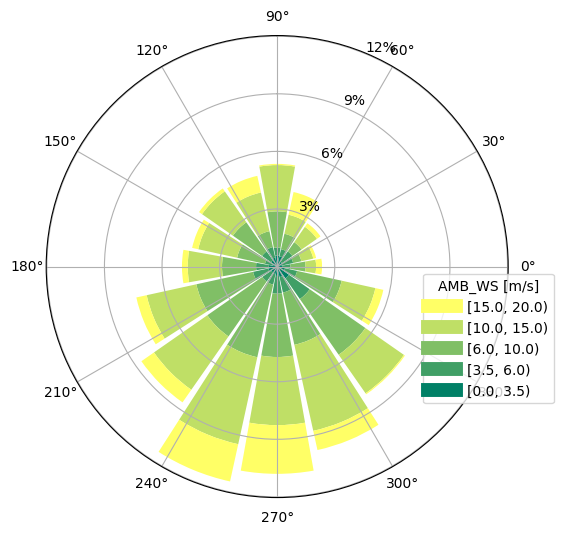
For the time series with uniform data, any choice of the point argument will produce the same figure.
Next, we create the example wind farm with 67 turbines from static data. The file test_farm_67.csv has the following structure:
index,label,x,y
0,T0,101872.70,1004753.57
1,T1,103659.97,1002993.29
2,T2,100780.09,1000779.97
3,T3,100290.42,1004330.88
...
For more options, check the API section foxes.input.farm_layout.
We consider two turbine models in this example: the wind turbine type NREL5MW and the turbine model kTI_02, both from the default model book. The latter model adds the variable k for each state and turbine, calculated as k = kTI * TI, with constant kTI = 0.2. The parameter k will later be used by the wake model.
farm = foxes.WindFarm()
foxes.input.farm_layout.add_from_file(
    farm, "test_farm_67.csv", turbine_models=["NREL5MW"], verbosity=0
)
Next, create the algorithm with Bastankhah2014_quadratic_ka02 for wind-speed deficits and CrespoHernandez_max_ka04 for turbulence intensity:
algo = foxes.algorithms.Downwind(
    farm,
    states,
    rotor_model="centre",
    wake_models=["Bastankhah2014_quadratic_ka02", "CrespoHernandez_max_ka04"],
    verbosity=0,
)
Also notice the chunks parameter, specifying that always 1000 states should be considered in vectorized form during calculations. The progress is automatically visualized when invoking the DaskRunner:
farm_results = algo.calc_farm()

fr = farm_results.to_dataframe()
print("\n", fr[[FV.WD, FV.AMB_REWS, FV.REWS, FV.AMB_P, FV.P]])
DefaultEngine: Selecting engine 'process'
ProcessEngine: Calculating 8000 states for 67 turbines
ProcessEngine: Starting calculation using 3 workers, for 3 states chunks.
ProcessEngine: Completed all 3 chunks
                                  WD  AMB_REWS       REWS    AMB_P            P
state               turbine
2017-01-01 00:00:00 0        244.06     15.62  15.610693  5000.00  5000.000000
                    1        244.06     15.62  14.023413  5000.00  5000.000000
                    2        244.06     15.62  15.030155  5000.00  5000.000000
                    3        244.06     15.62  15.562047  5000.00  5000.000000
                    4        244.06     15.62  14.567863  5000.00  5000.000000
...                             ...       ...        ...      ...          ...
2017-06-16 15:30:00 62       299.19     11.70   8.163113  4868.75  1893.026992
                    63       299.19     11.70  11.495149  4868.75  4779.127558
                    64       299.19     11.70  11.700000  4868.75  4868.750000
                    65       299.19     11.70  11.643916  4868.75  4844.213456
                    66       299.19     11.70   8.057192  4868.75  1813.851262

[536000 rows x 5 columns]
Let’s evaluate the results:
# add capacity factor and efficiency to farm_results:
o = foxes.output.FarmResultsEval(farm_results, algo=algo)
o.add_capacity_factor()
o.add_capacity_factor(ambient=True)
o.add_efficiency()

# print results by turbine:
turbine_results = o.reduce_states()
turbine_results[FV.AMB_YLD] = o.calc_yield(annual=True, ambient=True)
turbine_results[FV.YLD] = o.calc_yield(annual=True)
turbine_results[FV.EFF] = turbine_results[FV.P] / turbine_results[FV.AMB_P]
print("\nResults by turbine:\n")
print(turbine_results)

# print power results:
P0 = o.calc_mean_farm_power(ambient=True)
P = o.calc_mean_farm_power()
print(f"\nFarm power        : {P / 1000:.1f} MW")
print(f"Farm ambient power: {P0 / 1000:.1f} MW")
print(f"Farm efficiency   : {o.calc_farm_efficiency():.2f}")
print(f"Annual farm yield : {turbine_results[FV.YLD].sum():.2f} GWh")
Capacity factor added to farm results
Ambient capacity factor added to farm results
Efficiency added to farm results

Results by turbine:

           AMB_CT         AMB_P   AMB_REWS  AMB_RHO    AMB_TI      AMB_WD  \
turbine
0        0.593832  2.454179e+07  10.142951    1.225  0.056837  214.291794
1        0.593832  2.454179e+07  10.142951    1.225  0.056837  214.291794
2        0.593832  2.454179e+07  10.142951    1.225  0.056837  214.291794
3        0.593832  2.454179e+07  10.142951    1.225  0.056837  214.291794
4        0.593832  2.454179e+07  10.142951    1.225  0.056837  214.291794
...           ...           ...        ...      ...       ...         ...
62       0.593832  2.454179e+07  10.142951    1.225  0.056837  214.291794
63       0.593832  2.454179e+07  10.142951    1.225  0.056837  214.291794
64       0.593832  2.454179e+07  10.142951    1.225  0.056837  214.291794
65       0.593832  2.454179e+07  10.142951    1.225  0.056837  214.291794
66       0.593832  2.454179e+07  10.142951    1.225  0.056837  214.291794

            AMB_YAW        CT      D     H  ...          X           Y  \
turbine                                     ...
0        214.291794  0.629228  126.0  90.0  ...  101872.70  1004753.57
1        214.291794  0.648236  126.0  90.0  ...  103659.97  1002993.29
2        214.291794  0.622346  126.0  90.0  ...  100780.09  1000779.97
3        214.291794  0.622028  126.0  90.0  ...  100290.42  1004330.88
4        214.291794  0.640991  126.0  90.0  ...  103005.58  1003540.36
...             ...       ...    ...   ...  ...        ...         ...
62       214.291794  0.633941  126.0  90.0  ...  101139.68  1002135.54
63       214.291794  0.637106  126.0  90.0  ...  101326.01  1001219.95
64       214.291794  0.614450  126.0  90.0  ...  100034.76  1002553.74
65       214.291794  0.641642  126.0  90.0  ...  102087.06  1001110.54
66       214.291794  0.642131  126.0  90.0  ...  104865.05  1001965.49

                YAW      order         CAPF     AMB_CAPF       EFF  tname  \
turbine
0        214.291794  30.747125  4223.676161  4908.357436  0.860507     T0
1        214.291794  29.423750  3682.904938  4908.357436  0.750333     T1
2        214.291794  33.122125  4106.374413  4908.357436  0.836609     T2
3        214.291794  34.077750  4178.651004  4908.357436  0.851334     T3
4        214.291794  31.093875  3831.571116  4908.357436  0.780622     T4
...             ...        ...          ...          ...       ...    ...
62       214.291794  31.599000  3935.543432  4908.357436  0.801805    T62
63       214.291794  35.948000  3900.239582  4908.357436  0.794612    T63
64       214.291794  39.153125  4411.685663  4908.357436  0.898811    T64
65       214.291794  27.239750  3816.195788  4908.357436  0.777489    T65
66       214.291794  28.507375  3856.602424  4908.357436  0.785722    T66

           AMB_YLD        YLD
turbine
0        26.873257  23.124627
1        26.873257  20.163905
2        26.873257  22.482400
3        26.873257  22.878114
4        26.873257  20.977852
...            ...        ...
62       26.873257  21.547100
63       26.873257  21.353812
64       26.873257  24.153979
65       26.873257  20.893672
66       26.873257  21.114898

[67 rows x 25 columns]

Farm power        : 166.4 MW
Farm ambient power: 205.5 MW
Farm efficiency   : 0.81
Annual farm yield : 1457.47 GWh
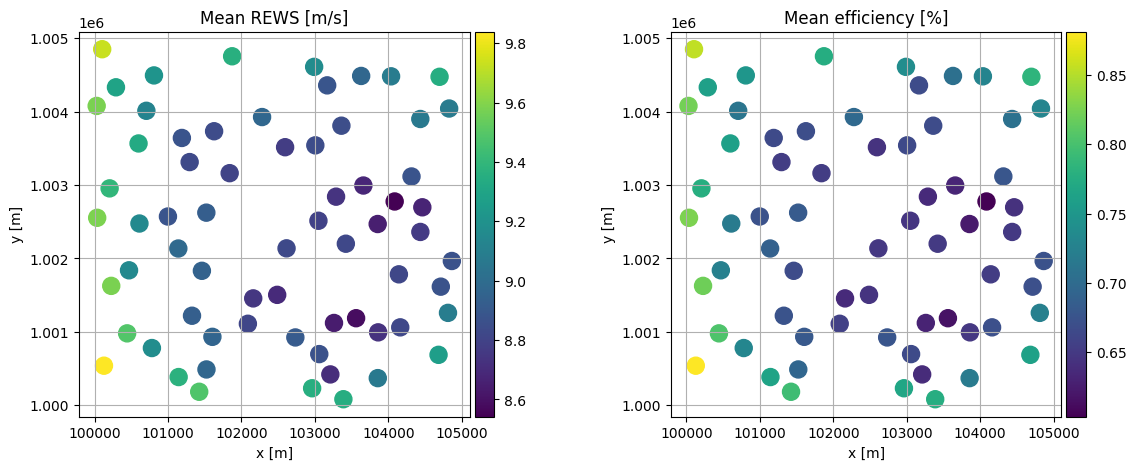
We can visualize the mean rotor equivalent wind speed as seen by each turbine and also the mean efficiency with respect to the time series data as colored layout plots:
fig, axs = plt.subplots(1, 2, figsize=(14, 5))
o = foxes.output.FarmLayoutOutput(farm, farm_results)
o.get_figure(
    fig=fig, ax=axs[0], color_by="mean_REWS", title="Mean REWS [m/s]", s=150, annotate=0
)
o.get_figure(
    fig=fig,
    ax=axs[1],
    color_by="mean_EFF",
    title="Mean efficiency [%]",
    s=150,
    annotate=0,
)
plt.show()